How to Redeem NBA 2K26 Locker Codes
Active Codes (April 2026)
You discovered an active locker code. You now have to redeem your locker code before it expires. This is quick to do; nevertheless, this process differs based on your mode and device.
This article will discuss all ways to your NBA 2K locker codes redeem: MyTEAM, MyCAREER, MyNBA2K App, and what to do if your locker codes are not going through. If you are still waiting for your locker code to be discovered, here are all active NBA 2K26 Locker Codes.
How to Redeem Locker Codes in NBA 2k26 MyTEAM?
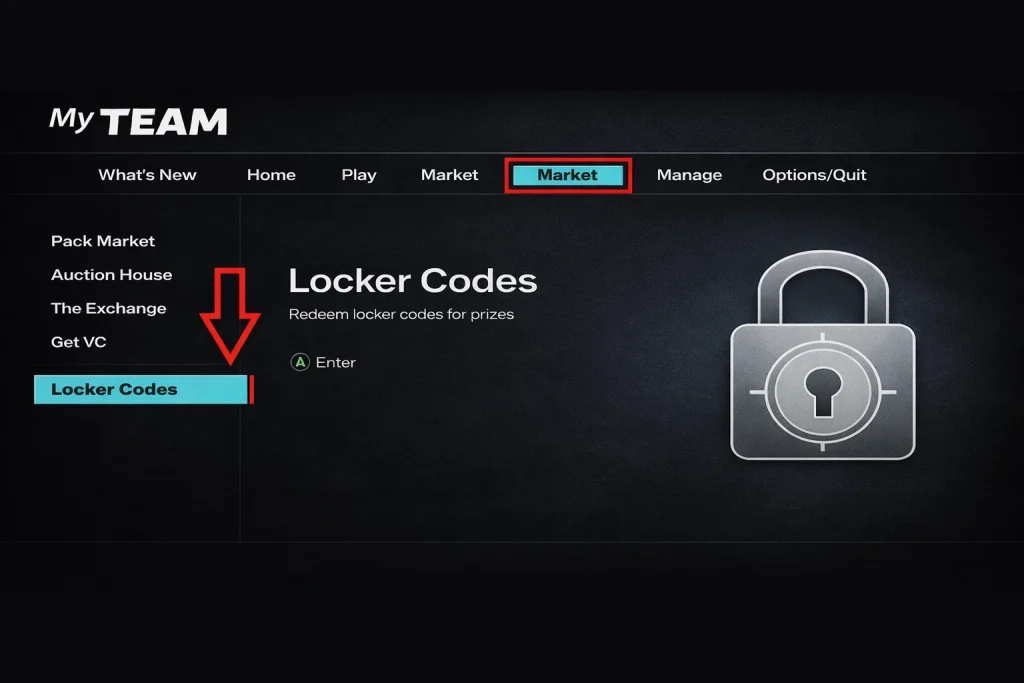
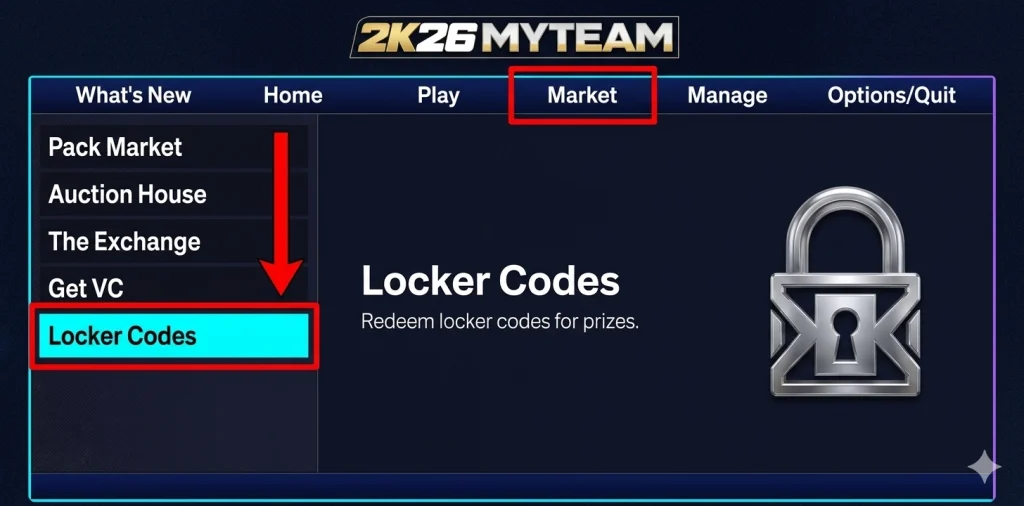
This is the most common method. The majority of the locker codes for NBA 2K26 are associated with rewards packs, player cards, banners, and events for MyTEAM. The steps are the same for PS5, PS4, Xbox Series X/S, Xbox One, and PC.
- Launch NBA 2K26 and enter MyTEAM mode from the main menu
- Look at the top navigation bar and select Market
- In the left sidebar, scroll down and select Locker Codes
- An on-screen keyboard appears. Type in your code
- Include every hyphen exactly as the code is written
- Press confirm to submit
The reward will be added to your account immediately. The MyTEAM packs will go straight to your Unopened Packs. The banners and cosmetic items will go straight into your collection.
One other thing to note: the keyboard for typing in the 2K games is a little slow. Copy the code from this site on your phone, and then type it in carefully, one character at a time. If you make one mistake, you’ll have to do it all over again from scratch.
How to Redeem NBA 2K26 Locker Codes in MyCAREER
Some of the locker code rewards can be for MyCAREER rewards, boosts, double XP tokens, clothing, and VC. These rewards can also be obtained by using the MyCAREER menu. This menu is in a totally different location compared to the MyTEAM menu.
- Load into MyCAREER mode.
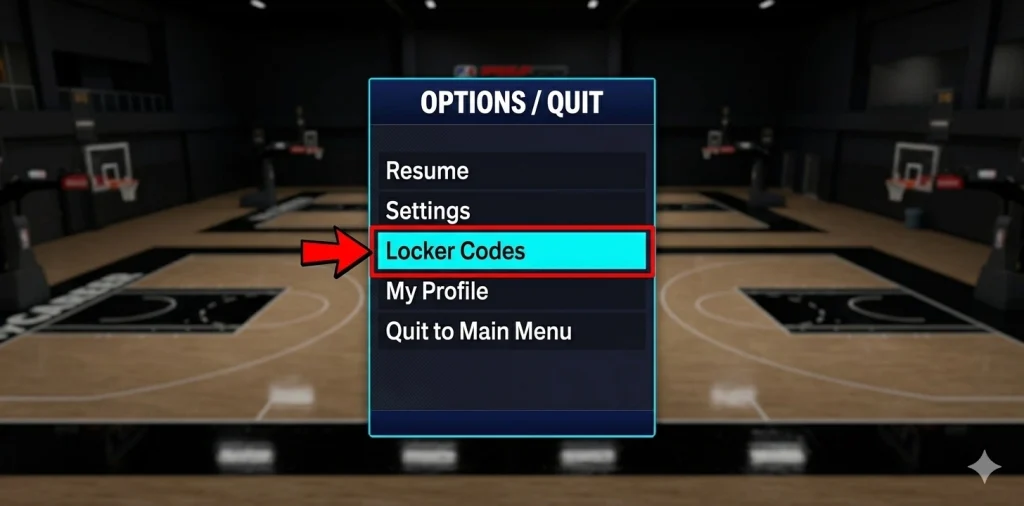
- Press your pause or options button to open the menu
- Select Options/Quit from the menu bar
- Choose Locker Codes from the list
- Enter your code and confirm
The MyCAREER method will work for any code, not just MyCAREER-specific ones. If you are already in MyCAREER and do not wish to exit the Mode simply to enter MyTEAM and redeem your code, then this will save you the trouble.
How to Redeem NBA 2K26 Locker Codes on Mobile (MyNBA2K App)
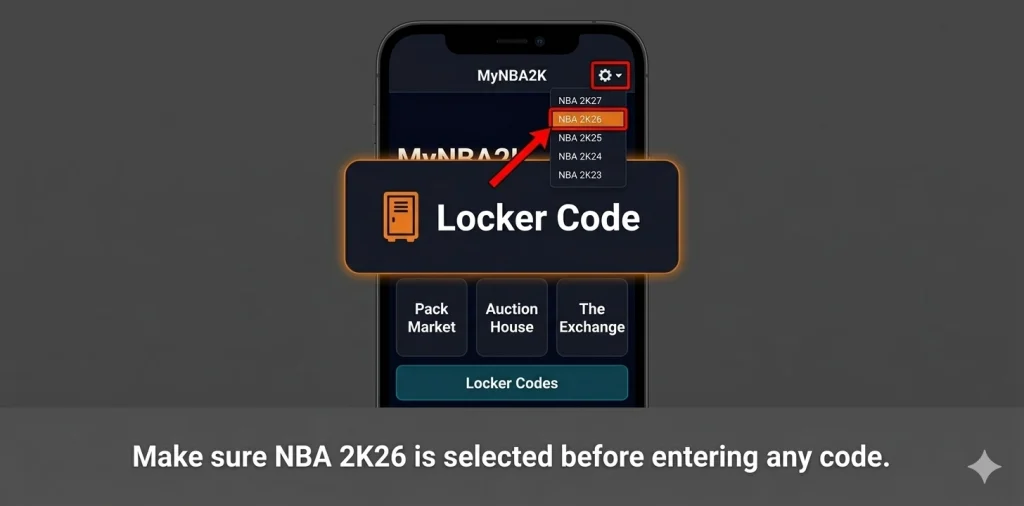
You do not need to be at your console to redeem your code. The MyNBA2K app allows you to redeem your code remotely.
Here is how to redeem NBA 2K26 locker codes on mobile through the app:
- Download the MyNBA2K app, available on the App Store (iOS) and Google Play (Android)
- Open the app and sign in with the same account linked to your gaming platform
- Tap the icon in the top right corner to open the game selector
- Select NBA 2K26 from the list. This step is critical and easy to miss
- On the home screen, tap Locker Code
- Type in your code and submit
The most common error on mobile is entering a code while still on a previous 2K title in the game selector. The app will show an “invalid code” error even for a perfectly valid code. Always check the top-right corner first and confirm that NBA 2K26 is the active game before touching anything else.
This mobile method works for MyTEAM codes and MyCAREER codes equally. The rewards go to whichever mode they belong to and sit waiting for you in-game. Once you know the process, you can easily input the NBA 2K Mobile locker codes to upgrade your phone’s lineup.
How to Redeem NBA 2K Mobile Locker Codes
If you are worried about how to redeem locker codes in NBA 2K Mobile. Do not worry, we are here to help. NBA 2K Mobile is another game that is different from NBA 2K26. NBA 2K Mobile has its own system of codes and is different from NBA 2K26 in that aspect. The codes used for NBA 2K26 cannot be used for NBA 2K Mobile and vice versa.
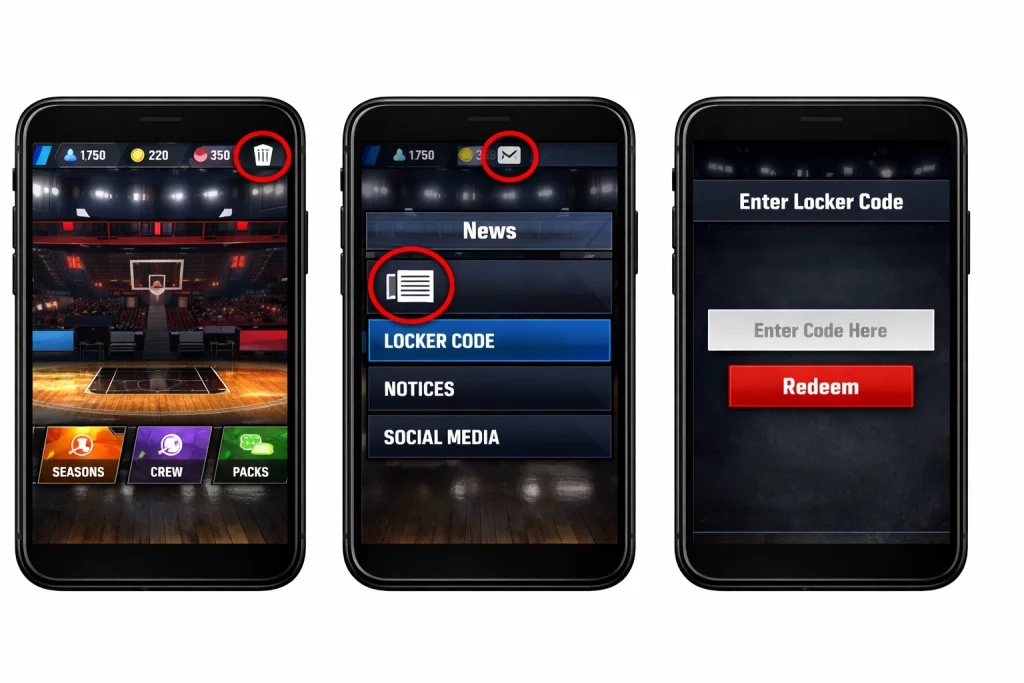
- Open NBA 2K Mobile on your phone
- From the home screen, tap the Clipboard icon in the navigation bar
- Tap the Newspaper icon that appears
- A code entry field opens. Type in your mobile-specific code
- Tap redeem to claim your reward
For all current working codes for the mobile game, check the dedicated NBA 2K Mobile Locker Codes page.
Types of NBA 2K26 Locker Codes
Before searching for how to redeem NBA 2k26 locker codes, it is better to know what kind of code you’re dealing with. Not all locker codes work the same way.
There are three types of locker codes in NBA 2K26:
Code Type | How It Works | What Happens When It’s Gone |
Unlimited | No expiry date, stays active all year | Never disappears unless 2K removes it |
Limited by time | Expires on a specific date and time | Permanently invalid after the deadline |
Limited by volume | Expires after a set number of redemptions | Locks out once enough players claim it |
The limited-by-volume type catches many players off guard. The code looks active online, but returns an error in-game. That means someone else got the last redemption before you. 2K Support will not restore access once those limits are hit, so speed matters with every code you find.
NBA 2K26 Locker Code Redemption Platform Comparison
Platform | Path to Locker Codes | App Redemption Available |
PS5 | MyTEAM → Market → Locker Codes | Yes, via the MyNBA2K app |
PS4 | MyTEAM → Market → Locker Codes | Yes, via the MyNBA2K app |
Xbox Series X/S | MyTEAM → Market → Locker Codes | Yes, via the MyNBA2K app |
Xbox One | MyTEAM → Market → Locker Codes | Yes, via the MyNBA2K app |
PC | MyTEAM → Market → Locker Codes | Yes, via the MyNBA2K app |
MyCAREER (all platforms) | Options/Quit → Locker Codes | Yes, via the MyNBA2K app |
NBA 2K Mobile | Clipboard icon → Newspaper icon | Directly in the mobile game |
Code Entry Rules What to Know Before You Type
A few quick rules that apply on every platform:
Capitalization does not matter
You can type in all caps, all lowercase, or mixed. The game treats them identically.
No spaces
Not before the code, not after, not in the middle. One accidental space breaks the whole thing.
One redemption per account
Each code works once on your profile. If you’ve already claimed it, re-entering it will return an error.
Hyphens are not optional
Every code uses hyphens between words. MYTEAM ALUMNI will not work. MYTEAM-ALUMNI will. Leave one out, and the code fails.
Copy and paste where possible
On PC, you can paste directly into the input field. On the console, copy the code on your phone and reference it character by character to avoid typos.
Why Is My NBA 2K26 Locker Code Not Working?
If a code fails, one of these reasons covers almost every case:
The code has expired
Most codes stay live for around seven days. If it’s not on the active list at NBA 2K26 Locker Codes, it’s gone.
You already redeemed it
The game counts per account, not per session. Even if you redeemed it months ago, entering it again returns an error.
You're missing a hyphen or have a typo
Go back character by character. The on-screen keyboard makes it easy to mistype. No shortcut here, just check carefully.
The wrong game was selected in the MyNBA2K app.
If you’re on the mobile app and the top right corner shows a previous 2K title, every code will fail. Switch to NBA 2K26 first.
The code hit its volume limit.
Some codes expire when enough players claim them, not by date. If a high-demand code drops and you’re late, it may already be gone even if the date looks fine.
Server load after a big drop
Right when a popular code goes live, 2K’s servers take a hit. Wait 10 to 15 minutes and try again before writing it off as invalid.
If none of the above applies, contact 2K Support directly. They can check whether a code was valid for your account and region.
What Rewards Can You Get From Locker Codes?
Not every code gives the same type of reward. Here is what different codes unlock:
Reward Type | Mode | What It Does |
MyTEAM Player Pack | MyTEAM | Gives you one or more player cards to use in your squad |
Option Pack | MyTEAM | Let you choose one player from a shortlist |
VC (Virtual Currency) | MyCAREER | Currency used to upgrade your MyPlayer attributes |
Skill Boost | MyCAREER | Temporarily raises specific player ratings for a set number of games |
Gatorade Boost | MyCAREER | Boosts stamina and energy recovery for a set number of games |
Apparel / Cosmetics | MyCAREER | Clothing items for your MyPlayer, no gameplay impact |
Banner | MyTEAM | Decorative banner displayed on your MyTEAM profile |
Event Card | MyTEAM | Special cards used in limited-time events and exchange sets |
Double XP Token | MyCAREER | Doubles XP earned for a set number of games |
When one drops, it will save you grinding time. If you want to progress faster, it is also important to note the NBA 2K26 Animation Requirements before you start spending your VC points, so you won’t waste upgrading attributes that won’t give you access to the animations you want to acquire.
Another source of free VC points that most gamers miss is 2KTV. Every week, a new episode is available within the game, and answering the trivia questions correctly will reward you with VC points every time. Check this page for 2KTV answers for this week.
FAQs
Do locker codes work on all platforms?
Yes. The same code works on PS5, PS4, Xbox Series X/S, Xbox One, and PC. NBA 2K Mobile has a different set of codes altogether. While there are a few platform restrictions on certain promotional codes, these are noted when applicable.
Can I redeem a code on someone else's account?
You can give it to another person, but you will have to sign in to their account to do so. The reward will be given to the account that is currently active when you enter the code. One account per user.
Does the code still work if I redeemed it on a previous console?
No. The reward is based on your 2K account, not your console. If you entered a reward code on your old PS4 and now play on PS5, you’ve already redeemed it on your account.
Where do I find my rewards after redeeming?
MyTEAM packs appear in your Unopened Packs under the Manage tab. MyCAREER boosts and apparel show up in your MyPlayer inventory. VC is added to your total balance immediately.
Can I redeem codes if I'm not connected to the internet?
No. NBA 2K26 requires an internet connection to process locker code redemptions. All codes are verified in real-time with 2K’s servers.